How to fix Error: pg_config executable not found. pg_config is required to build psycopg2 from source.

When using pip to install the pyscopg2 package, you might encounter the following error:
Error: pg_config executable not found.

pg_config is required to build psycopg2 from source.
Please add the directory containing pg_config to the $PATH
or specify the full executable path with the option:

python setup.py build_ext --pg-config /path/to/pg_config build ...

or with the pg_config option in 'setup.cfg'.

If you prefer to avoid building psycopg2 from source, please install
the PyPI 'psycopg2-binary' package instead.
This error occurs because the path to pg_config is not found in your system.
The pg_config executable file can be obtained by installing PostgreSQL in your system.
To resolve this error, you need to install PostgreSQL, which contains the pg_config executable file.
Use one of the following commands for Mac or Linux:
# For Mac
brew install postgresql

# For Linux
# Create the file repository configuration:
sudo sh -c 'echo "deb http://apt.postgresql.org/pub/repos/apt $(lsb_release -cs)-pgdg main" > /etc/apt/sources.list.d/pgdg.list'

# Import the repository signing key:
wget --quiet -O - https://www.postgresql.org/media/keys/ACCC4CF8.asc | sudo apt-key add -

# Update the package lists:
sudo apt-get update

# Install the latest version of PostgreSQL.
# If you want a specific version, use 'postgresql-12' or similar instead of 'postgresql':
sudo apt-get -y install postgresql
For Windows, you can download the installer from the PostgreSQL download page and run the installer.
Once finished, you need to add the path to Postgres bin/ folder on the environment variable as shown below:
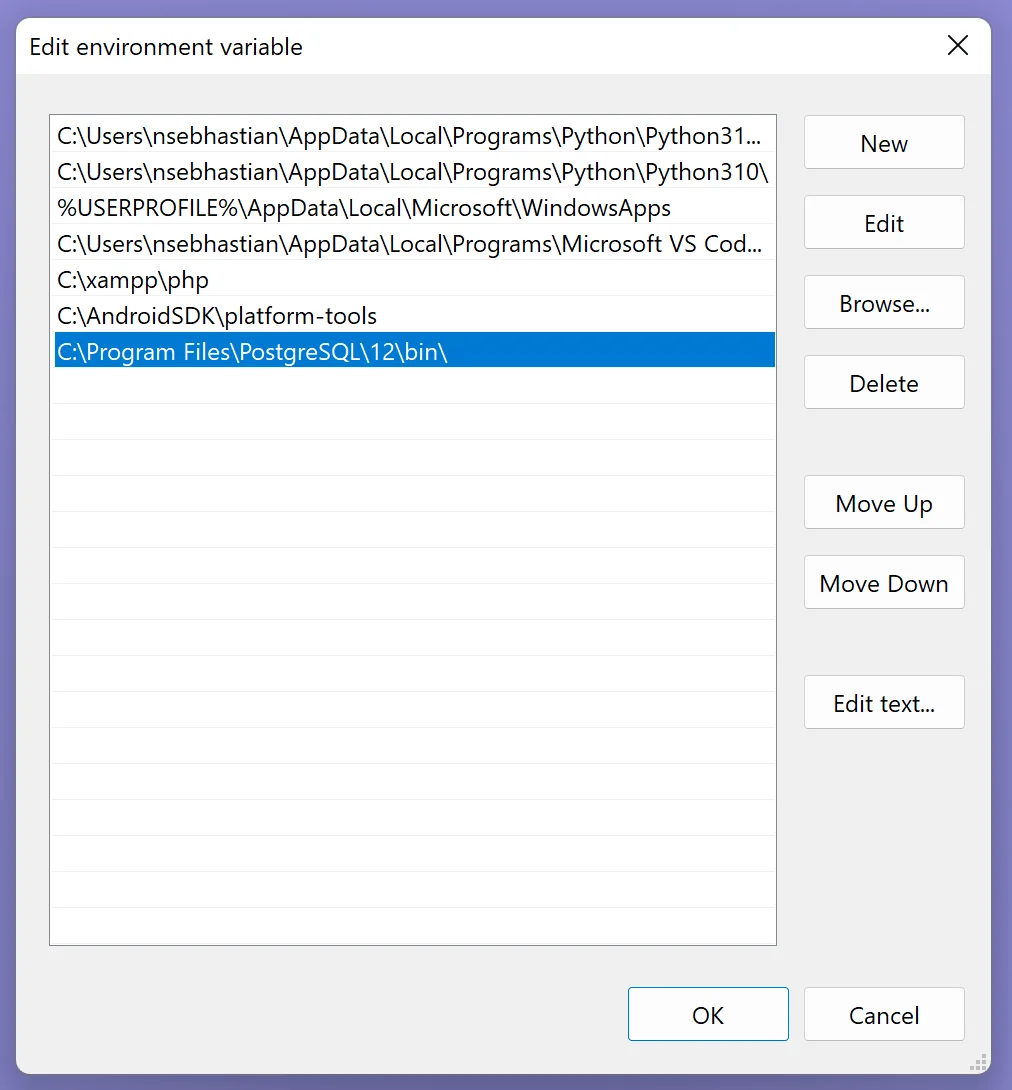
Now you should be able to install psycopg2 without receiving the error.
If installing PostgreSQL doesn’t work, then you can try to use the psycopg2-binary package instead of psycopg2.
pip install psycopg2-binary

# For pip3:
pip3 install psycopg2-binary

# if you don't have pip in your PATH:
python -m pip install psycopg2-binary

python3 -m pip install psycopg2-binary

# Windows
py -m pip install psycopg2-binary

# Anaconda
conda install psycopg2-binary

# Jupyter Notebook
!pip install psycopg2-binary
The psycopg2-binary is a pre-compiled psycopg2 distribution, which isn’t recommended for production use.
This is because the C libraries used to compile the package can’t be upgraded, requiring you to wait until the package maintainer released a newer version.
You need to build psycopg2 from source if you want to maintain the ability to upgrade the package binary yourself.
I hope this tutorial is helpful. See you in other tutorials! 👋