How numpy log10 function works with examples

The numpy log10() function is used to calculate the base 10 logarithm of the input value.
The numpy.log10() function accepts either a number or an array of numbers.
The syntax of the function is as follows:
numpy.log10(n)

# or
numpy.log10([n, n, n, ...])
Here are some examples of the log10() function in action:
import numpy as np

np.log10(18)
# 1.255272505103306
np.log10([8, 29])
# array([ 2.07944154, 3.36729583 ])
np.log10(2**8)
# 2.4082399653118496
You can also create a graphical representation to compare the original array and the log10() array.
Here’s how to create a plot using the matplotlib library:
import numpy as np
import matplotlib.pyplot as plt

my_array = [2, 4, 6, 8, 10]
log10_array = np.log10(my_array)

plt.plot(my_array, my_array, color = 'green', marker = "*")
plt.plot(log10_array, my_array, color = 'red', marker = "o")

plt.title("Log10 array plot")
plt.ylabel("my_array")
plt.xlabel("log10_array")
plt.show()
The output will be as follows:
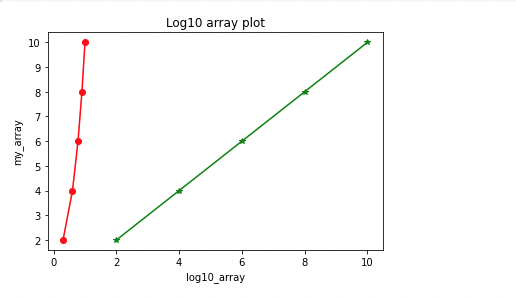
Now you’ve learned how the numpy.log10() function works. Good work! 👍
More Python tutorials
See allPython
How to Fix AttributeError: NoneType object has no attribute 'something'
May 30, 2023
Python
How to fix command 'gcc' failed with exit status 1 when installing or building a Python package
May 30, 2023
Python
How to fix command not found: jupyter notebook
May 30, 2023
Python
Why and when you need to use colon (:) in Python
May 30, 2023
Python
How to print integers in Python
May 30, 2023